This site uses cookies and other tracking technologies to assist with navigation and your ability to provide feedback, analyse your use of our site and services and assist with our promotional and marketing efforts. You can read more about this in our Privacy Policy.

ASUS ProArt MD300 mouse Office Right-hand RF Wireless + Bluetooth Optical 4200 DPI
xOut of Stock
Contact your account manager
- RF 2.4GH
- Bluetooth
- Optical
- 109g
- 1000 Hz
SKU #: 90XB04F0-BMU000
EAN #: 4711081274469
UNSPSC #: 43211708
- Smart dial and side scroll
- Independent middle button
- Up to 4200 dpi, and the ability to track on glass*
- Quick charge function
- Minimum 4 mm glass thickness

| Device interface | RF Wireless + Bluetooth |
|---|---|
| Buttons quantity | 6 |
| Movement detection technology | Optical |
| Scroll type | Wheel |
| SKU | 90XB04F0-BMU000 |
| EAN | 4711081274469 |
| Manufacturer | ASUS |
| Availability | Out of Stock |
| Mouse | |
|---|---|
| Customizable movement resolution | Yes |
| Number of programmable buttons | 6 |
| Buttons type | Pressed buttons |
| Wireless range | 10 m |
| Purpose | Office |
| Movement resolution | 4200 DPI |
| Scroll type | Wheel |
| Programmable mouse buttons | Yes |
| Polling rate | 1000 Hz |
| Movement detection technology | Optical |
| Buttons quantity | 6 |
| Device interface | RF Wireless + Bluetooth |
| Input device | |
| Customizable movement resolution | Yes |
| Number of programmable buttons | 6 |
| Buttons type | Pressed buttons |
| Wireless range | 10 m |
| Purpose | Office |
| Movement resolution | 4200 DPI |
| Scroll type | Wheel |
| Programmable mouse buttons | Yes |
| Polling rate | 1000 Hz |
| Movement detection technology | Optical |
| Buttons quantity | 6 |
| Device interface | RF Wireless + Bluetooth |
| Ports & interfaces | |
| Wireless range | 10 m |
| Design | |
| Product colour | Black |
| Form factor | Right-hand |
| Surface coloration | Monochromatic |
| Technical details | |
| Weight | 109 g |
| Product colour | Black |
| Form factor | Right-hand |
| Surface coloration | Monochromatic |
| Rechargeable | Yes |
| Programmable mouse buttons | Yes |
| Polling rate | 1000 Hz |
| Ergonomics | |
| Wireless range | 10 m |
| Rechargeable | Yes |
| Power | |
| Battery capacity | 800 mAh |
| Power source | Batteries |
| Battery technology | Lithium-Ion (Li-Ion) |
| Battery type | Built-in battery |
| Rechargeable | Yes |
| Software | |
|---|---|
| Windows operating systems supported | Windows 10, Windows 11 |
| System requirements | |
| Windows operating systems supported | Windows 10, Windows 11 |
| Weight & dimensions | |
| Weight | 109 g |
| Width | 118 mm |
| Depth | 72 mm |
| Height | 42 mm |
| Packaging data | |
| Quantity per pack | 1 pc(s) |
| Receiver included | Yes |
| Batteries included | Yes |
| User guide | Yes |
| Warranty card | Yes |
| Packaging content | |
| Receiver included | Yes |
| Batteries included | Yes |
| User guide | Yes |
| Warranty card | Yes |
| Logistics data | |
| Quantity per pack | 1 pc(s) |
| Other features | |
| Weight | 109 g |
| Polling rate | 1000 Hz |

Creativity, dialed up
ASUS ProArt Mouse MD300 is the first mouse that works with ASUS Dial, allowing creators to make quick and precise settings adjustments. This premium mouse also features a side scroll wheel and three buttons with professional-grade switches that provide tactile mouse clicks. ProArt Mouse MD300 has a high-performance laser sensor that tracks at up to 4200 dpi for unmatched precision, even when used on a glass surface.
Level up with ASUS Dial
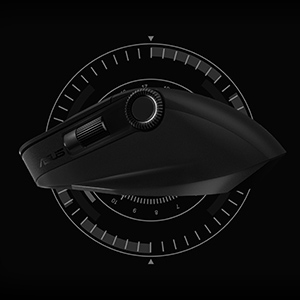
The new ASUS Dial feature makes working with creative apps as natural and intuitive as possible. The built-in side scroll wheel offers precise, seamless control with ASUS Dial, simply rotate and click to change brush size, saturation, and adjust layer opacity. It can also be used to rapidly undo previous actions for a smoother workflow. ASUS Dial scrolls through 100 lines per revolution and lasts 5X longer than traditional mouse scrolls.
Designed to last
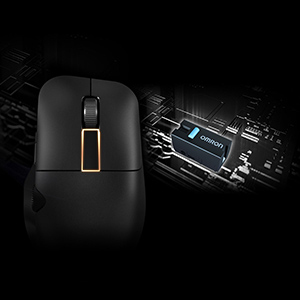
Aside from the left and right mouse buttons, a large middle button independent of the middle scroll wheel helps improve the creative workflow. Use it to control CAD software precisely or program it for other functions through the creator app. All three mouse buttons utilise pro-grade switches that are rated for up to a 50-million-click lifespan and provide satisfyingly tactile feedback with each click.
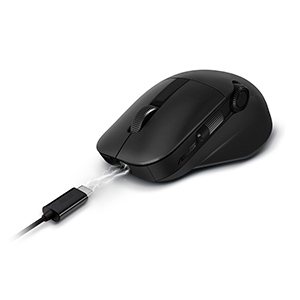
Power up in the blink of an eye
ProArt Mouse MD300 stays powered for up to 150 days on a full charge — and gets 3 hours heavy use or up to 8 hours of light use from a one-minute quick charge. Use the included USB-C® charging cable to top up the power.
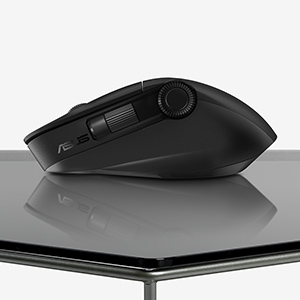
Fast and accurate tracking on almost any surface
A high-end laser sensor tracks at up to 4200 dpi and works on a wide range of surfaces, including glass3 — delivering the accuracy and precision you need. With a polling rate of up to 1000 Hz, lag is kept to a minimum for smooth, accurate control. The pivoted buttons mechanism leaves no gap between the button and switch, so click response is instantaneous and consistent. In addition, low-friction PTFE mouse feet provide a smooth glide.
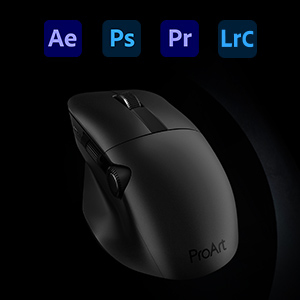
Perfect for creativity apps
ProArt Mouse MD300 is perfect for creativity apps like Adobe After Effects, Photoshop, Premiere Pro, Lightroom Classic and more.
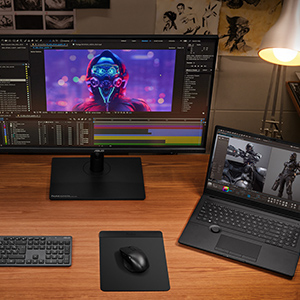
Dual-mode connectivity
The RF 2.4 GHz wireless connection provides high data throughput to ensure accurate, lag-free input for a seamless creative workflow. You can also connect up to three devices via Bluetooth fast pairing technology and switch between them by pressing the pair button.
Creativity, dialed up
ASUS ProArt Mouse MD300 is the first mouse that works with ASUS Dial, allowing creators to make quick and precise settings adjustments. This premium mouse also features a side scroll wheel and three buttons with professional-grade switches that provide tactile mouse clicks. ProArt Mouse MD300 has a high-performance sensor that tracks at up to 4200 dpi for unmatched precision, even when used on a glass surface.
DIAL
Crafted for the best
The ASUS Dial on ProArt Mouse MD300 is the best in its class and features quality components. The grease layer in the dial wheel holder ensures smooth and stable scrolling, providing impeccable user experience.
MIDDLE BUTTON
Designed to last
Aside from the left and right mouse buttons, a large middle button independent of the middle scroll wheel helps improve the creative workflow. Use it to control CAD software precisely or program it for other functions through the creator app. All three mouse buttons utilize pro-grade switches that are rated for up to a 50-million-click lifespan and provide satisfyingly tactile feedback with each click.
FAST CHARGING
Power up in the blink of an eye
ProArt Mouse MD300 stays powered for up to 150 days on a full charge — and gets 3 hours heavy use or up to 8 hours of light use from a one-minute quick charge. Use the included USB-C® charging cable to top up the power.
PRECISION SENSOR
Fast and accurate tracking on almost any surface
A high-end sensor tracks at up to 4200 dpi and works on a wide range of surfaces, including glass3 — delivering the accuracy and precision you need. With a polling rate of up to 1000 Hz, lag is kept to a minimum for smooth, accurate control. The pivoted buttons mechanism leaves no gap between the button and switch, so click response is instantaneous and consistent. In addition, low-friction PTFE mouse feet provide a smooth glide.
CUSTOMIZATION
Perfect for creativity apps
ProArt Mouse MD300 is perfect for creativity apps like Adobe After Effects, Photoshop, Premiere Pro, Lightroom Classic and more.
* Some commands may require combining in-app keyboard shortcuts.
SOFTWARE
Personalize your creative gear
An intuitive UI lets you easily tune ProArt Mouse MD300 to suit your creative needs. Adjust performance settings and customize commands for the ASUS Dial, six programmable buttons and two scrolls.
CONNECTIVITY
Dual-mode connectivity
The RF 2.4 GHz wireless connection provides high data throughput to ensure accurate, lag-free input for a seamless creative workflow. You can also connect up to three devices via Bluetooth fast pairing technology and switch between them by pressing the pair button.
SCENARIO
A partner for your imagination
ProArt Mouse MD300 is designed to fulfill your creative mind.
ASUS ProArt Mouse MD300 is the first mouse that works with ASUS Dial, allowing creators to make quick and precise settings adjustments. This premium mouse also features a side scroll wheel and three buttons with professional-grade switches that provide tactile mouse clicks. ProArt Mouse MD300 has a high-performance sensor that tracks at up to 4200 dpi for unmatched precision, even when used on a glass surface.
DIAL
Crafted for the best
The ASUS Dial on ProArt Mouse MD300 is the best in its class and features quality components. The grease layer in the dial wheel holder ensures smooth and stable scrolling, providing impeccable user experience.
MIDDLE BUTTON
Designed to last
Aside from the left and right mouse buttons, a large middle button independent of the middle scroll wheel helps improve the creative workflow. Use it to control CAD software precisely or program it for other functions through the creator app. All three mouse buttons utilize pro-grade switches that are rated for up to a 50-million-click lifespan and provide satisfyingly tactile feedback with each click.
FAST CHARGING
Power up in the blink of an eye
ProArt Mouse MD300 stays powered for up to 150 days on a full charge — and gets 3 hours heavy use or up to 8 hours of light use from a one-minute quick charge. Use the included USB-C® charging cable to top up the power.
PRECISION SENSOR
Fast and accurate tracking on almost any surface
A high-end sensor tracks at up to 4200 dpi and works on a wide range of surfaces, including glass3 — delivering the accuracy and precision you need. With a polling rate of up to 1000 Hz, lag is kept to a minimum for smooth, accurate control. The pivoted buttons mechanism leaves no gap between the button and switch, so click response is instantaneous and consistent. In addition, low-friction PTFE mouse feet provide a smooth glide.
CUSTOMIZATION
Perfect for creativity apps
ProArt Mouse MD300 is perfect for creativity apps like Adobe After Effects, Photoshop, Premiere Pro, Lightroom Classic and more.
* Some commands may require combining in-app keyboard shortcuts.
SOFTWARE
Personalize your creative gear
An intuitive UI lets you easily tune ProArt Mouse MD300 to suit your creative needs. Adjust performance settings and customize commands for the ASUS Dial, six programmable buttons and two scrolls.
CONNECTIVITY
Dual-mode connectivity
The RF 2.4 GHz wireless connection provides high data throughput to ensure accurate, lag-free input for a seamless creative workflow. You can also connect up to three devices via Bluetooth fast pairing technology and switch between them by pressing the pair button.
SCENARIO
A partner for your imagination
ProArt Mouse MD300 is designed to fulfill your creative mind.
| Mouse | |
|---|---|
| Customizable movement resolution | Yes |
| Number of programmable buttons | 6 |
| Buttons type | Pressed buttons |
| Wireless range | 10 m |
| Purpose | Office |
| Movement resolution | 4200 DPI |
| Scroll type | Wheel |
| Programmable mouse buttons | Yes |
| Polling rate | 1000 Hz |
| Movement detection technology | Optical |
| Buttons quantity | 6 |
| Device interface | RF Wireless + Bluetooth |
| Input device | |
| Customizable movement resolution | Yes |
| Number of programmable buttons | 6 |
| Buttons type | Pressed buttons |
| Wireless range | 10 m |
| Purpose | Office |
| Movement resolution | 4200 DPI |
| Scroll type | Wheel |
| Programmable mouse buttons | Yes |
| Polling rate | 1000 Hz |
| Movement detection technology | Optical |
| Buttons quantity | 6 |
| Device interface | RF Wireless + Bluetooth |
| Ports & interfaces | |
| Wireless range | 10 m |
| Design | |
| Product colour | Black |
| Form factor | Right-hand |
| Surface coloration | Monochromatic |
| Technical details | |
| Weight | 109 g |
| Product colour | Black |
| Form factor | Right-hand |
| Surface coloration | Monochromatic |
| Rechargeable | Yes |
| Programmable mouse buttons | Yes |
| Polling rate | 1000 Hz |
| Ergonomics | |
| Wireless range | 10 m |
| Rechargeable | Yes |
| Power | |
| Battery capacity | 800 mAh |
| Power source | Batteries |
| Battery technology | Lithium-Ion (Li-Ion) |
| Battery type | Built-in battery |
| Rechargeable | Yes |
| Software | |
|---|---|
| Windows operating systems supported | Windows 10, Windows 11 |
| System requirements | |
| Windows operating systems supported | Windows 10, Windows 11 |
| Weight & dimensions | |
| Weight | 109 g |
| Width | 118 mm |
| Depth | 72 mm |
| Height | 42 mm |
| Packaging data | |
| Quantity per pack | 1 pc(s) |
| Receiver included | Yes |
| Batteries included | Yes |
| User guide | Yes |
| Warranty card | Yes |
| Packaging content | |
| Receiver included | Yes |
| Batteries included | Yes |
| User guide | Yes |
| Warranty card | Yes |
| Logistics data | |
| Quantity per pack | 1 pc(s) |
| Other features | |
| Weight | 109 g |
| Polling rate | 1000 Hz |
You may also be interested in
| Product |
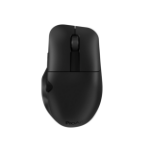 ASUS ProArt MD300 mouse Office Right-h...
Login for pricing
ASUS ProArt MD300 mouse Office Right-h...
Login for pricing
|
Hot Product
Kensington Expert Mouse Wired Optical...
Login for pricing
|
Bestseller
Evoluent VerticalMouse 4 mouse Right-h...
Login for pricing
|
New
Kensington Expert Mouse® Wireless Trac...
Login for pricing
|
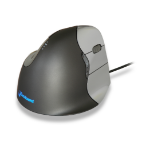
Popular
BakkerElkhuizen Evoluent4 Mouse (Right...
Login for pricing
|
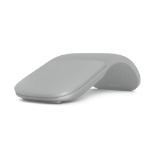
Recommended
Microsoft Surface Arc mouse Travel Amb...
Login for pricing
|
|---|---|---|---|---|---|---|
| SKU |
90XB04F0-BMU000
|
64325
|
VM4R
|
K72359WW
|
BNEEVR4
|
FHD-00002
|
| Manufacturer |
ASUS
|
Kensington
|
Evoluent
|
Kensington
|
BakkerElkhuizen
|
Microsoft
|
| Buttons quantity |
6
|
4
|
6
|
4
|
6
|
2
|
| Movement detection technology |
Optical
|
Trackball
|
Laser
|
Trackball
|
Laser
|
BlueTrack
|
| Purpose |
office
|
office
|
office
|
office
|
office
|
Travel
|
| Device interface |
RF Wireless + Bluetooth
|
USB Type-A
|
USB Type-A
|
RF Wireless + Bluetooth
|
N/A
|
Bluetooth
|
| Scroll type |
Wheel
|
Ring
|
Wheel
|
Ring
|
Wheel
|
Touch
|
| Connectivity technology |
N/A
|
Wired
|
N/A
|
Wireless
|
N/A
|
N/A
|