This site uses cookies and other tracking technologies to assist with navigation and your ability to provide feedback, analyse your use of our site and services and assist with our promotional and marketing efforts. You can read more about this in our Privacy Policy.


HP HP S3 PRO 327QHG2 QHD MNTR
xOut of Stock
Contact your account manager
- ITOR - 327QH G2
SKU #: D81YCAA#ABU
EAN #: 0821844382165
UNSPSC #: 43211902
- QHD helps teams see more content at once and without compromising readabilty. The HP Series 3 Pro 27 inch QHD Monitor delivers clear text, consistent detail, and a 1500:1 contrast ratio[1] that provides focused, comfortable viewing.
- A fluid on‐screen experience supports comfort and focus throughout the workday. With a 120Hz[1] refresh rate, scrolling and task switching appear consistent and controlled, helping users stay comfortable and productive during work sessions.
- Four‐way adjustability—height, tilt, pivot, and swivel—helps users create a comfortable setup for work. Paired with the HP Ergonomic Setup Guide[2], teams can quickly dial in consistent, comfortable viewing across shared or deployed workspaces.
- This energy-efficient monitor is thoughtfully designed with at least 85% post-consumer recycled plastic content in the monitor's enclosure[5], 20% recycled glass in the monitor panel[6], 10% recycled metal in the stand.[7]
| SKU | D81YCAA#ABU |
|---|---|
| EAN | 0821844382165 |
| Manufacturer | HP |
| Availability | Out of Stock |
Built-in 2 X 2W speakers
Listen to music, meetings and more with the built-in, dual 2W speakers.
Always-on, True Color, Low-Blue Light
Help protect your eyes with hardware-based HP Eye Ease that reduces blue light without impacting color.
Convenient ports
Designed for effortless setup, this monitor lets you quickly connect and enjoy QHD visuals with HDMI 1.2 and DisplayPort 1.2.[1,9]
3-sided boarderless bezel
See and do more on your screen with a 3-sided boarderless bezel that maximizes your viewing area for a sleek design and virtually seamless dual-monitor setups.
Designed with purpose
HP is committed to helping protect our shared future by minimizing the energy our monitors consume to help reduce energy demand. This monitor is held to the highest energy saving standard with an ENERGY STAR rating and EPEAT Gold Registration.[3,4]
More contrast
See the nuanced differences of color, shadow, and highlights thanks to the enhanced 1500:1 contrast ratio.[1]
HP Display Center
Customize your monitor with the intuitive HP Display Center that lets you tailor your settings, partition screens, and more—all through the host PC.[10]
Remote management reimagined
HP Client Management Script Library (CMSL) makes remote manageability easy to use. This powerful solution works seamlessly with Intune/SCCM to manage your display fleet using PowerShell.[11]
Work in comfort
Achieve all-day comfort with tilt, base swivel 3600, pivot, and 100mm height adjustability when you apply the best practices from the Ergonomic Setup Guide.[2]
99% sRGB Color Gamut
Enjoy highly accurate colors on screen with 99% sRGB. This HP monitor provides ideal color reproduction with minimal effort.[1]
Bring focus to your workflow
QHD helps teams see more content at once and without compromising readabilty. The HP Series 3 Pro 27 inch QHD Monitor delivers clear text, consistent detail, and a 1500:1 contrast ratio[1] that provides comfortable viewing throughout the day. With fewer interruptions from scrolling and resizing windows, users stay focused and productive making this display a practical choice for detail-oriented work.
Smoother motion for everyday work
A fluid on‐screen experience supports seamless work throughout the workday. With a 120Hz refresh rate[1], scrolling documents, moving windows, and switching between tasks appear consistent and controlled, supporting smooth interaction with content. From spreadsheets and dashboards to email and documents, reduced visual interruption during long sessions helps users stay comfortable, engaged, and productive from start to finish.
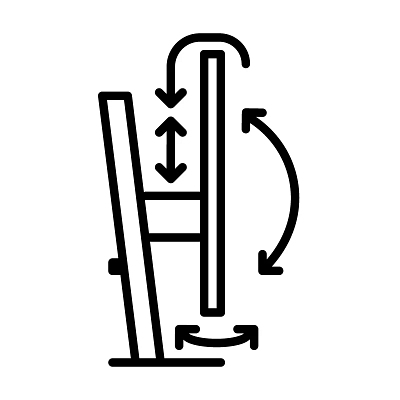
Comfort built around how work gets done
With four‐way adjustability—height, tilt, pivot, and swivel—the HP Series 3 Pro 27 inch QHD Monitor gives each user the ability to adjust their display to their own preferences, supporting comfort and consistency throughout the workday. Paired with the HP Ergonomic Setup Guide[2], team members can create a setup that fits how they work, allowing them to dial in their workspace quickly while enjoying comfortable viewing and a consistent experience across shared or deployed environments.
Related Products

Out of stock
